Friday, January 08, 2016

Typical mistakes with String in Java

Just few typical mistakes developers do when dealing with Strings. It's common stuff and everybody knows that, but for some reasons I still find such things (even written by myself :-)).

1. Checking empty string


In old days (version 1.5 and lower) we used String.equal(""), but 1.6 brought us String.IsEmpty which is better and faster.
 // wrong/slow  
 if (name.equals("")) {  
 // correct/fast
 if (name.isEmpty()) {

2. Concatenation


Method String.concat creates new String object, it's OK to use it when you do operation only once, otherwise use operator + += operators (see below why).
 String s = "Hello ".concat("new").concat(" world!"); // "Hello new world!"  
Using operators + and +=, they do not use String.concat method but StringBuilder and it's important to know what it means to us.
 String s = "Hello " + "new" + " world!"; // "Hello new world!"
What actually happens when you use + operator is StringBuilder used:
 String s = new StringBuilder().append("Hello ").append("new").append(" world!").toString(); // "Hello new world!"
So conclusion - it's ok to use concat if you do one time operation, for any other situation I would recommend to use + or +=.

3. String Formatting


Very often in order to format string people either concatenate the string to achieve result or do replace or invent something else. I do it as well sometimes (what a shame!). Instead we should use String.format method to do that.
 int n = 10;  
 // wrong  
 String s = "I have " + Integer.toString(10) + " books";  
 // wrong  
 String s = "I have #num books".replace("#num", Integer.toString(10));  
 // correct  
 Strig s = String.format("I have %d books", n);  

I would be glad to hear other typical mistakes we do with String object! So please share your experience.

Thursday, January 07, 2016

SOAP and passing session

Here is an example how to pass session using SOAP envelope approach. I was starlight with it for some time.

That is why people use REST our days :) and not SOAP approach.

   // Create SOAP Connection  
   SOAPConnectionFactory soapConnectionFactory = SOAPConnectionFactory.newInstance();  
   SOAPConnection soapConnection = soapConnectionFactory.createConnection();  
   // connect to webserivce
   SOAPMessage soapResponse = soapConnection.call(connect(username, password), url);

   // read cookie from response and use it when send another requests
   MimeHeaders session = soapResponse.getMimeHeaders(); 
   String sesisonCookie = session.getHeader("Set-Cookie")[0];

   SOAPMessage soapResponse2 = soapConnection.call(customerGetAll(sesisonCookie), url);
   soapConnection.close();

Here is how we add cookie to soap request

   SOAPBody soapBody = envelope.getBody();
   SOAPElement soapBodyElem = soapBody.addChildElement("Customer_GetAll", "m");
   soapMessage.getMimeHeaders().addHeader("Cookie", sesisonCookie);
   soapMessage.saveChanges();

Wednesday, January 06, 2016

Java web-consumer in Domino and cookie session

Recently I've faced with few mistake that drain hours from me. I had to make integration with web-serivce. I imported WSDL file and got java classes generated, than I according to documentation I checked connect method with credentials...
Error connecting to 'endpoint' on port '443', SSL invalid certificate, may need to cross-certify
Spend some time and found very detailed answer on stackoverflow: Create cross certificate for Domino Java agent?

Tried connect method again - it worked! Gonna be easy task now (I thought). However nothing else except connect method worked. All other method of consumer either did nothing or returned null to me. I was confused, spend few hours and than contacted web-service provider, they were not familiar with Java and provided me example in PHP that worked as expected.

My issue was I had to set SESSION_MAINTAIN_PROPERTY to true for my proxy object.

 SecretServiceLocator service = new SecretServiceLocator();  
 SecretPortType port = service.getSecretPort();  
 ((javax.xml.rpc.Stub)port)._setProperty(javax.xml.rpc.Stub.SESSION_MAINTAIN_PROPERTY, Boolean.TRUE);  

SESSION_MAINTAIN_PROPERTY

Standard property: This boolean property is used by a service client to indicate whether or not it wants to participate in a session with a service endpoint. If this property is set to true, the service client indicates that it wants the session to be maintained. If set to false, the session is not maintained. The default value for this property is false.
Once I set session maintain to true - everything started to work.

Tuesday, January 05, 2016

DSAPI for Domino

This post is about to make short summary about DSAPI filter. I've finished my project some time ago and it looks like I'm not going to do any work with it in near future.

What is DSAPI?

The Domino Web Server Application Programming Interface (DSAPI) is a C API that lets you write your own extensions to the Domino Web Server. DSAPI extensions, or filters, are notified whenever a particular event occurs during the processing of a request.
I've written few articles about DSAPI before and now it is time to publish my work/project on github. You can find it here: domino-dsapi-handler. I did not have time to make a documentation for it (and I'm not sure I will do it, without funding), but all sources are there.

In this post I will highlight most important things you need to know if you are going to build your own DSAPI filter.

Initialization

Domino calls the initialization function when the filter is loaded. The filter is loaded when the Domino HTTP server task is started or when the HTTP task is restarted with the Domino console command 'tell http restart'.
 DLLEXPORT unsigned int FilterInit(FilterInitData* filterInitData) {  
  // init events you want to handle  
  filterInitData->eventFlags = kFilterRewriteURL | kFilterResponse | kFilterTranslateRequest;  
  // another code  
  return kFilterHandledRequest;  
 } // end FilterInit  

Terminate filter

The filter may also define a termination entry point. Domino will call this function whenever the filter is about to be unloaded. The filter can use this function to clean up resources it allocated
 DLLEXPORT unsigned int TerminateFilter(unsigned int reserved) {  
  return kFilterHandledEvent;  
 }     // end TerminateFilter  

HttpFilterProc

The Event Notification function does the actual work of the filter. Domino calls the Event Notification function whenever a particular event occurs during the processing of an http request. When Domino calls the filter's Event Notification function it passes information about the request and the event being processed. On each call the filter can decide to handle the event, with or without an error return, or decline to handle the event.
 DLLEXPORT unsigned int HttpFilterProc(FilterContext* context, unsigned int eventType, void* eventData) {  
      switch (eventType) {  
           case kFilterTranslateRequest:  
                return QueryRewrite(context, (FilterMapURL *) eventData);  
           case kFilterRewriteURL:  
                return RewriteURL(context, (FilterMapURL *) eventData);  
           case kFilterResponse:  
                return ResponseHeaders(context, (FilterResponseHeaders *) eventData);  
           default:  
                return kFilterNotHandled;  
      }  
 }     // end HttpFilterProc  

The rest of logic you can read yourself in SEOUrlHandler.c file. I've added information about how to compile DLL in readme on github. However If you have any question regarding some details let me know either via email or as a comment to this post. I will be glad to help.

Related topics
Rewriting URL in Domino using DSAPI
Solution for Lotus Domino to the trailing slash problem
Replacement for DSAPI in Java/XPages

Used materials
Domino Web Server Application Interface (DSAPI)

Monday, January 04, 2016

Format datetime object in Lotus Script

Sometimes datetime output become tricky in Lotus Notes.

F.x. imagine you have code like this and you have german or any another locale on user's PC.
 Set dt = New NotesDateTime("")  
 Call dt.SetNow  
 msgbox Format$(dt.LSLocalTime, "dddd, dd. MMMM yyyy")  

Out would be
Tuesday, 22. December 2015

But what if you want output in german i.e.?
22. Dezember 2015

In such case you may want to use LS2J approach to display it properly to user

Below you will find a solution that either allow to set locale or use default locale.
 Option Public  
 Option Declare  
 UseLSX "*javacon"  
 Sub Initialize   
  On Error GoTo errhandler  
  Dim jSession As New JavaSession  
  Dim jCalendarClass As Javaclass, jLocaleClass As JavaClass, jSimpleDateFormatClass As JavaClass
  Dim jCalendar As Javaobject, jLocale As Javaobject, jSDF As JavaObject, jDate As Javaobject  
  Dim jError As JavaError  
  Dim dt As New NotesDateTime("")  
  Call dt.SetNow  
  'in order to initiate date - we have to use Calendar object  
  Set jCalendarClass = jSession.GetClass("java.util.Calendar")  
  Set jCalendar = jCalendarClass.getInstance()  
  Call jCalendar.set(Year(dt.DateOnly), month(dt.DateOnly) - 1, day(dt.DateOnly))  
  'initialize date object  
  Set jDate = jCalendar.getTime()  
  'IMPORTANT  
  'create locale (here we specify langauge/country code)   
  Set jLocaleClass = jSession.GetClass("java.util.Locale")  
  Set jLocale = jLocaleClass.CreateObject("(Ljava/lang/String;Ljava/lang/String;)V", "de", "DE")  
  'also you can use local settings, if you need that - enable line below  
  'Set jLocale = jLocaleClass.getDefault()  
  'output format  
  Set jSimpleDateFormatClass = jSession.GetClass("java.text.SimpleDateFormat")  
  Set jSDF = jSimpleDateFormatClass.CreateObject("(Ljava/lang/String;Ljava/util/Locale;)V", "dd. MMMM yyyy", jLocale)  
  'result  
  MsgBox jSDF.format(jDate)  
  done:  
  Exit Sub  
  errhandler:  
  Set jError = jSession.GetLastJavaError()  
  MsgBox "JavaError was " & jError.errorMsg  
  jSession.ClearJavaError  
  Resume done  
 End Sub  

Related topics:
Locale settings for date and time in IBM Domino and Notes

Tuesday, October 27, 2015

Locale settings for date and time in IBM Domino and Notes

Recently we setup 2 new IBM Domino servers and today I found an issue related to how we display time in our application. The 12-hours format was used (with AM or PM). I've checked OS date settings and they were right so I started to google and found out that in order to change locale settings to 24-hours you have either update notes.ini with a ClockType variable or change register.

I went with notes.ini (feel more safe with it). Below few variables that control date/time format output.
 DateOrder=YMD  
 DateSeparator=.  
 TimeSeparator=:  
 CLOCKTYPE=24_HOUR  

It is also possible for windows OS to change register (but I personally do not like that).
 HKEY_USERS\.DEFAULT\Control Panel\International\iDate  
 HKEY_USERS\.DEFAULT\Control Panel\International\iTime  
 HKEY_CURRENT_USER\Control Panel\International\iDate  
 HKEY_CURRENT_USER\Control Panel\International\iTime  

You may find more information about it in article Timely information in NOTES.INI

Related topics:
Format datetime object in Lotus Script

Monday, October 19, 2015

Using preceding-sibling and following-sibling in xpath

In this article I will show few examples about how to use following-sibling and preceding-sibling

Our XML example we are going to use.
 <div id="cities">  
 <country>France</country>  
   <city>Paris</city>  
   <country>UK</country>  
   <city>London</city>  
   <city>Manchester</city>  
   <city>Liverpool</city>  
   <country>Denmark</country>  
   <city>Copenhagen</city>  
   <country>Ukraine</country>  
   <city>Kiev</city>  
   <city>Odessa</city>  
 </div>  

Taking all city elements after element UK

 /div/country[.='UK']/following-sibling::city  
 <city>London</city>  
 <city>Manchester</city>  
 <city>Liverpool</city>  
 <city>Copenhagen</city>  
 <city>Kiev</city>  
 <city>Odessa</city>  

Taking all city elements before element Denmark

 /div/country[.='Denmark']/preceding-sibling::city  
 <city>Paris</city>  
 <city>London</city>  
 <city>Manchester</city>  
 <city>Liverpool</city>  

Let's increase difficulty little bit and try to use preceding-sibling and following-sibling in the brackets []

Taking all city elements following till first country is UK

 /div/city[following-sibling::country='Denmark']  
 <city>Paris</city>  
 <city>London</city>  
 <city>Manchester</city>  
 <city>Liverpool</city>  

Taking all city elements from bottom till first country is Denmark

 /div/city[preceding-sibling::country='Denmark']  
 <city>Copenhagen</city>  
 <city>Kiev</city>  
 <city>Odessa</city>  

Let's increase difficulty even more and start using both preceding-sibling and following-sibling in one xpath.

Taking all city elements between two elements

In this example I'm going to get cities after UK and before Ukraine.
 /div/city[preceding-sibling::country='UK' and following-sibling::country='Ukraine']  
 <city>London</city>  
 <city>Manchester</city>  
 <city>Liverpool</city>  
 <city>Copenhagen</city>  

Wednesday, October 14, 2015

Setup Play Framework and TypeSafe on centOS

I'm going to setup simple project based on Play Framework together with Cassandra on two centOS servers.

I'm going to do 3 steps during that process:
  1. Install Java
  2. Install Typesafe activator
  3. Create test project.

Installing Java

//1. go to opt folder
cd /opt

//2. download java
wget --no-cookies --no-check-certificate --header "Cookie: gpw_e24=http%3A%2F%2Fwww.oracle.com%2F; oraclelicense=accept-securebackup-cookie" "http://download.oracle.com/otn-pub/java/jdk/8u60-b27/jdk-8u60-linux-x64.tar.gz"

//3. extract java archive
tar xzf jdk-8u60-linux-x64.tar.gz

//4. installing java
cd /opt/jdk1.8.0_60/
alternatives --install /usr/bin/java java /opt/jdk1.8.0_60/bin/java 2
alternatives --config java

//5. recommended options: setup javac and jar
alternatives --install /usr/bin/jar jar /opt/jdk1.8.0_60/bin/jar 2
alternatives --install /usr/bin/javac javac /opt/jdk1.8.0_60/bin/javac 2
alternatives --set jar /opt/jdk1.8.0_60/bin/jar
alternatives --set javac /opt/jdk1.8.0_60/bin/javac

//6. setup variables so we can access java from everywhere
export JAVA_HOME=/opt/jdk1.8.0_60
export JRE_HOME=/opt/jdk1.8.0_60/jre
export PATH=$PATH:/opt/jdk1.8.0_60/bin:/opt/jdk1.8.0_60/jre/bin

//7. checking java version
java -version

//8. delete java archive
rm jdk-8u60-linux-x64.tar.gz

Installing Play Framework / TypeSafe


Example is about current version, which is 1.3.6
//1. go to tmp folder and download typesafe activator
cd /tmp
wget https://downloads.typesafe.com/typesafe-activator/1.3.6/typesafe-activator-1.3.6.zip

//2. unzip and move to opt folder
unzip typesafe-activator-1.3.6.zip
mv activator-dist-1.3.6 /opt

//3. delete zip file, we do not need it anymore
rm typesafe-activator-1.3.6.zip

//4. create soft symbolic link from /opt/activator-dist-1.3.6/activator to /usr/local/sbin/activator
ln -s /opt/activator-dist-1.3.6/activator /usr/local/sbin/activator

//5. set variables so we can use activator from everywhere
export PATH=/usr/local/sbin/activator:$PATH

Create helloworld project


Time to create our first project. Play Framework provides many templates, we are going to use play-java (it has already web interface and some code, so we can discover it).
//1. create folder www in /var (we are going to keep projects there).
cd /var
mkdir www
cd www

//2. have a look on current templates
activator list-templates

//3. create a new project based on play-java template
activator new helloworld play-java

//4. go into newly created project and run it
cd helloworld
activator run

If activator run properly, you should see something like this:


Now you are ready to open project in browser. Type 127.0.0.1:900 and boooom, we have it ready!


I'm going to play with centOS little bit more (before I start to look on code). I already have some minor issues I want to optimise.

Saturday, July 04, 2015

Transformation of String into Date respecting Locale

Let's say you need to parse a string into date and it is localized string (f.x. name of month on local language). In past I would definitely define an array with months and then parse a String to get a number of my month and then build a Date object. In Java it's pretty simple (almost 1 line of code).

Locale approach

package parser;

import java.text.ParseException;
import java.text.SimpleDateFormat;
import java.util.Date;
import java.util.Locale;

public class parser {

 public static void main(String[] args) throws ParseException {
  Locale locale = new Locale("ru");
  Date date = convertStringToDate("19 Сентября 2004", "d MMMM yyyy", locale);
  System.out.println(date); // Sun Sep 19 00:00:00 CEST 2004
 }
 
 public static java.util.Date convertStringToDate(String dateString, String format, Locale locale) throws ParseException {
  return new SimpleDateFormat("d MMMM yyyy", locale).parse(dateString);
 }
}
Alternatively, if you need to define months yourself use DateFormatSymbols

Define symbols in DateFormatSymbols

package parser;

import java.text.DateFormatSymbols;
import java.text.ParseException;
import java.text.SimpleDateFormat;

public class parser {

 public static void main(String[] args) throws ParseException {
  String months[] = {"Январь", "Февраль", "Март", "Апрель", "Май", "Июнь", "Июль", "Август", "Сентябрь", "Октябрь", "Ноябрь", "Декабрь"};
  DateFormatSymbols dfs = new DateFormatSymbols();
  dfs.setMonths(months);
  
  SimpleDateFormat sdf = new SimpleDateFormat("d MMMM yyyy");
  sdf.setDateFormatSymbols(dfs);
  System.out.print(sdf.parse("19 Сентября 2004")); // Sun Sep 19 00:00:00 CEST 2004
 }
}

Monday, June 15, 2015

Insufficient memory - NSF pool is full

Recently I've faced up with an odd issue. When users tried to open Lotus Notes applications they got a warning saying
Insufficient memory - NSF pool is full

What 'Insufficient memory - NSF pool is full' is about?

As far as I understood it is memory leak on IBM Domino server. There are different kind of issues similar to this one:
  • Insufficient memory - NSF pool is full
  • Insufficient memory - index pool is full
  • Insufficient memory - NSF directory manager pool is full
  • Insufficient memory - Event pool is full
  • Insufficient memory - NSF Monitor pool is full
  • Insufficient memory - Network pool is full

Fixing the issue

Of course it require investigation why it happened but as a temporary fix you can simple increase memory while you are looking into the problem (if you do so :)). The variable name responsible for this pool is NSF_Buffer_Pool_Size (number of bytes) or alternatively you can use NSF_Buffer_Pool_Size_MB (number of megabytes). I'm not going to explain details about this variable, since you can find everything on IBM, just open this link: NSF_Buffer_Pool_Size

Adding or changing NSF_Buffer_Pool_Size_MB in notes.ini

I didn't find a default size for NSF_Buffer_Pool_Size (One article mentioned 32MB as a default value, however I could not really confirm that with IBM documentations). Anyway, for I set 64MB and from now I will keep my eyes open on this problem.
Let's change notes.ini using a Configuration Settings document
  1. First, open IBM Domino Administrator and find a Configuration tab there.
  2. Find Configuration settings now (in R9, it's nuder Server\Configurations), if it is not there, you may need to create it first.
  3. Highlight right server and and click button Edit Configuration and switch to NOTES.INI Settings tab.
  4. There must be a button: Set/Modify Parameters at the bottom, click on it and add/change your variable.
  5. Save configuration and Restart Server.

Done.

Tuesday, May 05, 2015

ColumnValuesIndex property of NotesViewColumn

Since there is no documentation about property ColumnValuesIndex of class NotesViewColumn. Let me describe it.
Let's create a view with 7 columns:
  1. @DocNumber
  2. Hidden (sorting) column that does sorting
  3. Column with formula value: Form
  4. Icon (static value: 12)
  5. Column with formula value: @Created
  6. Constant value: 100
  7. Total with 'hide details row' enabled (for each row value: 1)

Analyze ColumnValuesIndex

Let's write some code and check what exactly ColumnValuesIndex returns
  Dim ws As New NotesUIWorkspace
  Dim view As NotesView
  Dim col As NotesViewColumn
  Dim i As Integer
 
  Set view = ws.CurrentView.View
  For i = 0 To view.ColumnCount - 1
    Set col = view.Columns(i)
    Msgbox col.ColumnValuesIndex
  Next
The result for columns will be: -1, 0, 1, -1, 2, -1, 3.
We may see now that for some of columns we got (-1). Let's look on these 3 columns and try to guess how they are different compare to other columns. Here is my assumptions for what cases it returns (-1)
  • A formula containing a UI-only function such as @IsExpandable or @DocNumber.
  • A constant.

Summary for ColumnValuesIndex

Otherwise it returns columns position (without taking into account columns with -1), It looks like it is exactly same logic as in notesViewEntry.ColumnValues

Monday, May 04, 2015

Refresh embedded view

Here is the classic old issue. I've a form with embedded view on it (Show single category is used as well). There is an action on a view that create a new documents (which should be displayed in that embedded view). These solutions most likely wont work
  • ws.ViewRefresh will not help
  • Refreshing NotesUIDocument may cause a Notes client to crash, so it is not a way to go as well.
Here are some possible ways to solve it:

Refresh view by simulating of pressing F9

While searching for an example I found it on my blog :-), so you can easily find it here: how to emulate F9 key and save some minutes.

Refresh view by changing focus to another fields

The idea is to have 2 fields (let's call them FieldA and fieldB). Once you need to refresh embedded view - set focus to fieldA and then change it to fieldB. You also need either add refresh logic on Exiting property of fieldA (I prefer it, as it will not cause the perfomance on a form) or enable Automatically Refresh fields.

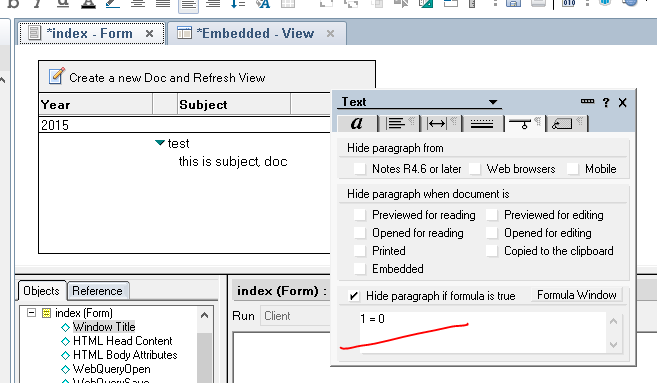
Refresh embedded view using hidden formula

Here the idea is to make sure we have hidden formula on Embedded View (even such like 1 = 0) and use Refresh
And here is code examples
  Call ws.ViewRefresh
  Call uidoc.RefreshHideFormulas
  Call ws.ViewRefresh

Please have a look on these 2 articles that inspired me:
  1. Refreshing an embedded view
  2. How to refresh NotesUIDocument from categorized embedded view

Monday, January 05, 2015

Find Orphan pages on website

You have a website and want to be sure that there are no Orphan pages? Not sure how to develop it? If so - you found a right place to go :), let's talk about most important steps.
I assume you have a list of all pages you want to verify (otherwise - it will be your first task)

Here is a logic/snippets
  1. We need functionality that can extract HTML from a web page. Later we will scan it and get internal links.
    private String getPageContent(String pageurl) throws Exception {
       StringBuffer buf = new StringBuffer();
       URL url = new URL(pageurl);
       InputStream is = url.openConnection().getInputStream();
       BufferedReader reader = new BufferedReader( new InputStreamReader( is )  );
       String line = null;
       while( ( line = reader.readLine() ) != null )  {
          buf.append(line);
       }
       reader.close();  
       return buf.toString();
    }
  2. Make a logic that can deal with DOM. I use jsoup to manipulate with HTML and I really recommend it (easy and fast). The method below select all links that begin with baseurl (it's domain of your website), in that way we can cut all external links and get only internal links.
    private List<string> getAllInernalLinks(String html, String baseurl) throws Exception {
       List<string> res = new ArrayList<string>();
       String select = "a[href^="+baseurl+"]";
       org.jsoup.nodes.Document dom = Jsoup.parse(html);
       Elements links = dom.select(select);
    
       for (Element link : links) {
          String src = link.attr("href");
          res.add(src);
       }
       return res;
    }
  3. Now we must build a List with all internal links from all pages on your website.
    String List<string> alllinks = getAllInernalLinks(html_from_all_pages, baseurl);
  4. We need to make sure that pageurl can be found in alllinks more then in pagelinks (to avoid case when page has link to itself).
    private boolean isOrphan(List<string> pagelinks, List<string> alllinks, String url) throws Exception {
       if (Collections.frequency(alllinks, url) > Collections.frequency(pagelinks, url)) {
          return false;
       }
       return true;
    }

Wednesday, October 29, 2014

Formatting a URL link in Drupal using function l

Another nice function in Drupal. It's called function l.
It formats a URL link as an HTML anchor tag.
I know it looks really easy and simple, it's just nice to use it after doing that manually many times.
$option = array();
$option['attributes'] = array('title' => $label);
l($label_trimmed, $uri['path'], $option));// will output [a href="$uri-path" title="$label">[/a]

Tuesday, October 28, 2014

Truncating a string on a word boundary in Drupal

Typical task: "truncate a string only on a word boundary and add a some postfix to resulting string". Every developer did it many times, I'm sure. Here is a how Drupal solves it with it's api: function views_trim_text
define(MAX_LENGTH, 30);

$alter = array(
    'max_length' => MAX_LENGTH,
    'word_boundary' => TRUE,
    'ellipsis' => TRUE
);

$mystring = "truncate a string only on a word boundary and add a some postfix to resulting string";
$mystring = views_trim_text($alter, $mystring); //result is 'truncate a string only on a...'

Monday, September 08, 2014

Issues when importing WSDL files into Web Service Consumer

Recently I faced up with WSDL which I couldn't import into Web Service Consumer. Our consumer worked well from last 5 years but it is a long period and during that time our Service Provider was updated a lot so we decided to update our Consumer as well. Guess everything went fine?
No WSDL was returned from the URL
I simply created new Consumer in Domino Designer, set URL to our WSDL, picked Java and clicked OK. Oops...
---------------------------
Domino Designer
---------------------------
No WSDL was returned from the URL:
https://api.ourserver.com/secure/api1/WebService?WSDL
---------------------------
OK
---------------------------
The requested operation failed: no import files
Wow, thought I :) let's try to import WSDL as Lotus Script then (just to see if it is not related to Java)
---------------------------
IBM Domino Designer
---------------------------
The requested operation failed: no import files
---------------------------
OK   
---------------------------
Name too long
Hey, what? This WSDL is used by many another applications without any issues, what is going on!? I downloaded WSDL as file to my local PC and tried to import it as Lotus Script again. This time it went fine (except issues with Name too long). Well, great news anyway, at least everything works when WSDL is a local file.


The Web Service implementation code generated from the provided WSDL could not be compiled, so no design element was created
Ok, it worked for Lotus Script, let's set now Java...
---------------------------
IBM Domino Designer
---------------------------
The Web Service implementation code generated from the provided WSDL could not be compiled, so no design element was created.  Please correct the WSDL and try again.  The errors are located in the following file:: C:\Users\dpa\AppData\Local\Temp\notes90C43B\47238811.err
---------------------------
OK   
---------------------------
OK, it's time to blame Designer and IBM! Why it is so difficult just to import WSDL? All another application that use WSDL from our server did not have such issues. It's just not fair :). Found a file with error and quite typical line: java.lang.OutOfMemoryError: Java heap space. I knew what to do, I increased HTTPJVMMaxHeapSize and JavaMaxHeapSize to 512M, restarted Designer/Notes and tried again. Worked well! I restored original values to HTTPJVMMaxHeapSize and JavaMaxHeapSize after that.
The system is out of resources.
Consult the following stack trace for details.
java.lang.OutOfMemoryError: Java heap space
at com.sun.tools.javac.util.Position$LineMapImpl.build(Position.java:151)
at com.sun.tools.javac.util.Position.makeLineMap(Position.java:75)
at com.sun.tools.javac.parser.Scanner.getLineMap(Scanner.java:1117)
at com.sun.tools.javac.main.JavaCompiler.parse(JavaCompiler.java:524)
at com.sun.tools.javac.main.JavaCompiler.parse(JavaCompiler.java:562)
at com.sun.tools.javac.main.JavaCompiler.parseFiles(JavaCompiler.java:816)
at com.sun.tools.javac.main.JavaCompiler.compile(JavaCompiler.java:739)
at com.sun.tools.javac.main.Main.compile(Main.java:365)
at com.sun.tools.javac.main.Main.compile(Main.java:291)
at com.sun.tools.javac.main.Main.compile(Main.java:282)
at com.sun.tools.javac.Main.compile(Main.java:99)
at lotus.notes.internal.IDEHelper.compile(Unknown Source)
Simple thing however it costed few hours for me. Hope it will save some time for other people.

Tuesday, July 08, 2014

Track events using google analytics via hitCallback

If you are using google analytics to track clicks/events then at some point you may want to track submits of forms. The only one way to do that is to use hitCallback function. It is easy to do it, however many people forget to verify cases when google analytics library is blocked, f.x. by extensions AdBlock or Ghostery) and it means hitCallback will not be defined and simply will not work.

Google analytics classic
jQuery(".form").on("submit", function(f) {
  var _this = this;
  _gaq.push(['_set','hitCallback',function() {
    $(_this).parents('form').first().submit();
  }]);
  _gaq.push(['_trackEvent', '/signup']);
  // here is check if google-analytics.js is loaded and if not - return true, otherwise false
  return !window._gat;
})
Google analytics universal
jQuery(".form").on("submit", function(f) {
  var _this = this;
  ga('send', 'pageview', '/signup', {
    'hitCallback': function() {
      $(_this).parents('form').first().submit();
    }
  })
  // here is check if google-analytics.js is loaded and if not - return true, otherwise false
  return !(ga.hasOwnProperty('loaded') && ga.loaded === true);
})

Monday, April 28, 2014

Disabling certificate validation in Java

In case you need to disable validation of certificate here is Java snippet.
 import javax.net.ssl.*;  
 import java.security.SecureRandom;  
 import java.security.cert.X509Certificate;  
 public static void disableCertificateValidation() {  
  // Create a trust manager that does not validate certificate chains  
  TrustManager[] trustAllCerts = new TrustManager[] {   
  new X509TrustManager() {  
   public X509Certificate[] getAcceptedIssuers() {   
   return new X509Certificate[0];   
   }  
   public void checkClientTrusted(X509Certificate[] certs, String authType) {}  
   public void checkServerTrusted(X509Certificate[] certs, String authType) {}  
  }};  
  // Ignore differences between given hostname and certificate hostname  
  HostnameVerifier hv = new HostnameVerifier() {  
  public boolean verify(String hostname, SSLSession session) { return true; }  
  };  
  // Install the all-trusting trust manager  
  try {  
  SSLContext sc = SSLContext.getInstance("SSL");  
  sc.init(null, trustAllCerts, new SecureRandom());  
  HttpsURLConnection.setDefaultSSLSocketFactory(sc.getSocketFactory());  
  HttpsURLConnection.setDefaultHostnameVerifier(hv);  
  } catch (Exception e) {}  
 }  
I took code from here: Java client certificates over HTTPS/SSL

Related topics:
IBM Domino Java: No trusted certificate found. Fail?
Domino and No trusted certificate found
Disabling certificate validation in Java

Thursday, March 20, 2014

Getting mail.box from Domino server

Domino allows to setup up to 10 mail boxes for 1 server. By default it 1 mail box with name mail.box however if you increase number of mail boxes to 2 and more Domino will create mail1.box, mail2.box ... and you must remember about it.
In order to get mail box without doing lookup to ServerConfig document, just try to initiate mail1.box first and if it does not exists go for mail.box
public Database getMailBox(Session session) throws NotesException{
 String server = session.getServerName();
 Database mailbox = session.getDatabase(server, "mail1.box");
 if (!mailbox.isOpen()) {
  mailbox = session.getDatabase(server, "mail.box");
 }
 return mailbox;
}
There is topic on how to force Domino to use mail.box when multiple mail.boxes are enabled

Tuesday, January 28, 2014

Domino and No trusted certificate found

We have few agents that communicate with other systems via and today at 13:00 we got such answer from Domino when we tried to set connection with external system. That was a huge problem for us since it affect our business.
 javax.net.ssl.SSLHandshakeException: com.ibm.jsse2.util.j: No trusted certificate found  
  at com.ibm.jsse2.o.a(o.java:8)  
  at com.ibm.jsse2.SSLSocketImpl.a(SSLSocketImpl.java:549)  
  at com.ibm.jsse2.kb.a(kb.java:355)  
  at com.ibm.jsse2.kb.a(kb.java:130)  
  at com.ibm.jsse2.lb.a(lb.java:135)  
  at com.ibm.jsse2.lb.a(lb.java:368)  
  at com.ibm.jsse2.kb.s(kb.java:442)  
  at com.ibm.jsse2.kb.a(kb.java:136)  
  at com.ibm.jsse2.SSLSocketImpl.a(SSLSocketImpl.java:495)  
  at com.ibm.jsse2.SSLSocketImpl.h(SSLSocketImpl.java:223)  
  at com.ibm.jsse2.SSLSocketImpl.a(SSLSocketImpl.java:724)  
  at com.ibm.jsse2.SSLSocketImpl.startHandshake(SSLSocketImpl.java:81)  
  at com.ibm.net.ssl.www2.protocol.https.c.afterConnect(c.java:8)  
  at com.ibm.net.ssl.www2.protocol.https.d.connect(d.java:20)  
It took some time to fix it, but here is a solution

Problem

A Java application running on a Domino server connecting over SSL to another server may require having the SSL certificate authority of the other server imported into its JVM.

Symptom

When a Java application running on a Domino server connects over SSL to another server, but does not have that server's trusted root certificates, an error may occur. One example of such an error is: HTTP JVM: javax.net.ssl.SSLHandshakeException: com.ibm.jsse2.util.g: No trusted certificate found.

Cause

The trusted root certificates that signed the remote server's SSL certificate must be also be trusted by the Domino server's JVM if a Java application is making an SSL connection.

Resolving the problem

To add the trusted root certificates to a Domino server JVM follow these steps:

A. Obtain the Certificate to be Imported

Each browser displays certificates in different ways, but they are usually quite similar. On the browser's URL bar, there is usually a zone that you can click on to display SSL certificate information. For example, you may see a padlock in the status bar, and clicking on the padlock opens the certificate information. Once the certificate information is open, click on the "Certification Path" informatino. There normally will be a way to export each of the signing certificates (trusted roots). Export the certifiers in the "Base-64 encoded X.509 (.CER)" format. The exported file in this format will be an ASCII text file that has "BEGIN CERTIFICATE" and "END CERTIFICATE" lines at the top and bottom. Once you have exported the certificates that signed the remote server's SSL certificate you can then import them into the JVM.

B. Import the SSL certifier into the JVM.

If Domino is on a UNIX server, perform these steps on a Windows workstation, and then move the cacerts to the server after the import is completed.
Import the SSL Certificate into the JVM using these steps:
  • Open a command line and change directory to C:\Lotus\Domino\jvm\bin.
  • Run the batch file "IKEYMAN.exe" (a Java application will load).
  • Click "Key Database File" then "Open".
  • Browse to C:\Lotus\Domino\jvm\lib\security\cacerts. Note, you will have to view "All Files" to locate cacerts.
  • Supply the default password of "changeit". Note, consult your administrator if you receive an error pertaining to the password.
  • Select "Signer Certificates" in the drop-down menu.
  • Click "Add"
  • Select "Browse" and locate the .CER file you copied.
  • Click "OK" and enter a descriptive label.
  • On the Domino console issue the command "restart task http".
Original link I found on IBM Importing an SSL Certificate Authority into the JVM

Related topics:
IBM Domino Java: No trusted certificate found. Fail?
Domino and No trusted certificate found
Disabling certificate validation in Java

Friday, October 18, 2013

Issues when developing IBM Domino Notes applications

Some minor stuff about Domino Designer.
  • Undo/'Ctrl+Z' does does not work properly when you developing in Lotus Script, if you do it few times it might mess your code
  • 'Ctrl+C'/'Ctrl+V' sometimes does not work from first attempt, so you need to do it twice
  • 'Ctrl+C'/'Ctrl+V' sometimes it sets focus on penultimate character so you have to do 1 extra actions to continue write code
  • I still have crashes in Domino Designer without any reasons and I've no customization to my Designer
  • I'm not happy about speed in Designer, however maybe I expect to much
It is 2013 and Ctrl+Z still work odd, how could it be?
Do you have something to add to that list? :) Please - comments about that!

Thursday, October 03, 2013

IBM Designer Java Console effect?

I've faced up with interesting problems. I'm doing integration between MailChimp and Domino application. MailChimp service has very good API so it was not huge problem to push/poll data to/from it and we already implemented solution based on Java. The fun started when I tried to do LS2J part. My first request to java method came up with this dialog
That error does not happen if I enable Java Console in IBM Domino Designer. When Console is up - everything works perfect, otherwise this error:
LS2J Error: Threw java.lang.SecurityException: not allowed to access members in class interface java.util.Map
I can't explain how Java Console affect my security level, however definitely it does. I think it possibly grant users with more access when it is running and maybe there is an explanation why. Does anybody of you can explain that?

Friday, August 09, 2013

How we cook GitHub, Jira and Jenkins with Domino

Why would I use it?

I'll describe briefly how we use GitHub, Jira and Jenkins together to make better development process. More details will come later when I get some desire :). OK, lets look what benefits we have from using these tools.

GitHub with Jenkins

GitHub has number of Service Hooks and one of them is for Jenkins. It allows to trigger build jobs when pushes are made to GitHub. You don't need to have any skill to do that, let's look on screen below. So once you made a push, Jenkins start to work.

GitHub with JIRA

It's possible to made connection between JIRA and GitHub, so once you made push to GitHub JIRA will update related ticket, you only need to specify ticket number in comments. As a result you will have history with commits directly in JIRA ticket. Let's look on ticket I've closed few days ago.
You can see what exactly have been done in order to fix the ticket. Also you can get more details if you wish, you only need to click on any of those updated files and then you will see that

Jenkins and Domino

That is most complicated part. In order to synchronize changes from GitHub to Domino application we use Jenkins (if you remember once push happens we trigger hook on Jenkins). Unfortunately there are no plugins that could do that, instead you have to write your own. That's it why we have ~60 seconds delay (I mentioned it in previous posts) after push.

Summary

For me JIRA and GitHub is de facto standard our days. Jenkins in our case is necessary to use in order to push changes from GitHub to Domino. It's a bit complicated process so you need before, if it is really what you need.

Other articles in this series

  1. How we build our web applications based on Domino
  2. Split back-end and front-end areas, they should not block each other and be independent as much as it is possible.
  3. Front-end guys should not have any knowledge about Domino, they don't need IBM Designer installed at all.
  4. Back-end guys must have knowledge about Domino, however they don't need to use IBM Designer, only in very rare cases. Backend should be done using only Java (no LS/SSJS/@Formula etc)
  5. Using Git+Jira is must and Jenkins server as builder server
  6. Auto-tests.

Thursday, August 08, 2013

Java as backend for web applications based on Domino

Is it enough to use only Java?

Yes. Our newly created applications have been written only for web and we did all back-end with Java only (the only exclusions are selection for Views). No, we do not miss @Formula, Lotus Script or SSJS, we simply do not need those languages in our daily work. Java is better than LS/SSJS for us. You can develop much better/faster using Java and get all candies: open sources, forums, stackoverflow or even shift at some point to Java completely if it has sense for you. However, if you read my main posts I mentioned that we still had some problems while work with Java, Solution isn't really perfect and let me explain all those weakness we have right now.
  • Domino has 2 Java runtimes (huge pain for us): one is for xPages and another one for Java Libraries+Agents. Java Libraries can be reuse in xPages and back JAVA/JAR are not accessible from Libraies/Agents. Our Java libraries are core for xPages and it means we have to build JAR from them and include them for xPages. It takes time and we really do not like that, it simply looks wrong. The solution is to put JAR to Domino OS, however we are limited with access to Domino's OS. Due to that fact we have one serious disadvantage - our JAR files that we attached to Libraries and Agents have to be extracted and loaded to memory each time we run agents.
  • We are forced to use IBM Designer (and few of us would like to work in different IDE). As I mentioned we work via GitHub and it takes some time to build project (developer -> github -> jenkins -> domino). That's not a problem for FE, as they can do their tasks locally and after all just commit changes. BE part is located on Server so if we work without IBM Designer we have to wait 1-2 mins till changes come to it and only then we can do our tests. That's sad.

Does it mean @formula, Lotus Script, SSJS are not required to know?

Those languages are still important part of our 'old applications' and it will take years to completely re-write them to web and there should be a sense to do that, as it is time/money, @formula language is still only 1 way to make selection in Notes Views.

Pros
  • open source;
  • problems resolving (forums, community);
  • more abilities;
  • in case of migration to java platform, easy migration;
Cons
  • 2 Java Runtimes
  • ...

Summary

We are happy with what we have so far. We still have problems in terms of how to setup our development process. We will continue to look for perfect solution for our problems.

Other articles in this series

  1. How we build our web applications based on Domino
  2. Split back-end and front-end areas, they should not block each other and be independent as much as it is possible.
  3. Front-end guys should not have any knowledge about Domino, they don't need IBM Designer installed at all.
  4. Back-end guys must have knowledge about Domino, however they don't need to use IBM Designer, only in very rare cases. Backend should be done using only Java (no LS/SSJS/@Formula etc)
  5. Using Git+Jira is must and Jenkins server as builder server
  6. Auto-tests.

Wednesday, August 07, 2013

Frontend developers without knowledge about Domino

Do FE developers must have understanding of IBM Domino/Notes platform?

I believe they should know we use Domino as server, however that's it. Domino is server, so it is responsibility of BE developers. Few years ago when we had mixed UI and Backend in our projects each time FE developer had to do something in IBM Designer I saw such face.
I do not like such face :), one more reason why we forced our self to do what we did.

More details how FE developers works

I will try to describe workspace for typical FE developer on our project. First of all as I mentioned before they do not need IBM Designer, so they can use whatever they prefer. As all FE are located in GitHub after you import project you will get that (example from my Eclipse)
Once they commited anything to GitHub special mechanism would be triggered on our Jenkins build server and it will push all changes to Domino application.

Except many obvious benefits, any disadvantage?

Atm only 2 disadvantages:
  1. It takes ~60 seconds after you commit appear in Domino application (Jenkins server has to push all changed elements from GitHub to Domino)
  2. If you lost connection to internet - it's a problem (no access to GitHub)

Summary

If you do that you could get such benefits as: GitHub, freedom for FE, better mood for FE, new FE don't need to know anything about IBM Domino

Other articles in this series

  1. How we build our web applications based on Domino
  2. Split back-end and front-end areas, they should not block each other and be independent as much as it is possible.
  3. Front-end guys should not have any knowledge about Domino, they don't need IBM Designer installed at all.
  4. Back-end guys must have knowledge about Domino, however they don't need to use IBM Designer, only in very rare cases. Backend should be done using only Java (no LS/SSJS/@Formula etc)
  5. Using Git+Jira is must and Jenkins server as builder server
  6. Auto-tests.

Tuesday, August 06, 2013

Split backend & frontend when build web applications

Is it really a problem to mix Backend (BE) and Frontend (FE)?

Yes, it is a problem, it's simply wrong. Some of you will argue with me and say:
  • I'm doing both: FE and BE and I'm 'pro' in both areas.
  • Our FE developers learned Domino platform in few weeks, so we have no problems, they feel comfortable with doing stuff with IBM Designer.
  • Our FE guys simply say what to change and we do that, they send us some template each time we need to change something.
  • We are doing internal website and our internal employee do not care about speed, modern UI etc.
I believe some of you are really perfect in both areas: FE and BE and you have enough time to improve skills in both areas just in time, so you don't follow practice that 10 years old. Honestly, at some point I thought I was good enough in both areas (FE and BE) to do modern stuff, however more I worked with web more I realized that my skills FE is not good enough to build really modern, fast and easy maintained web application. I spent years before I gave up and said to myself: I'm quite good in BE and I'm not bad in FE and that's actually enough, after that life became a bit more easy :).

Where is a problem?

Let's take an example when new FE developer joint to the team and he got tasks to change some UI.

1. Classic example (mail9.ntf, form memo)
Problems:
  • almost impossible to deal with that if you are not skilled in Domino;
  • have to know @Formula language to change <Compute Values> or hidden formulas;
  • have to know that fields might have some properties (classes, styles, id etc);
  • should ask for help each time they need to change UI;
2. xPages example (discussion9.ntf)
Problems:
  • more skill required about Domino, Java, SSJS and xPages especially;
  • controls will generate HTML automatically and it is a problem for our team as we aiming for 100% control;
  • as it's even more complicated, potentially FE will ask to involve BE developers each time they need to chagne UI.

If we split BE and FE then what?

Then life become much easier :), application will get better structure, things will go faster. How to do that? In our case we found template framework The Apache Velocity Project and tested it enough to make sure it would cover our needs. Then we started to move out UI from logic step by step, and yes, that process took months but once we did it we started to receive benefits immediately. Today we keep UI (HTML templates, CSS, JS) as files and our FE guys use GitHub. They are free to create new templates and organize their structure. They have huge freedom (compare to what they had 2 years ago) of how to do their job. There are really a lot of documentation + stackoverflow.com that can help. However Velcoity itself is quite intuitive and simple framework.

Wanna see 'Hello world' example?

In example bellow we pass 2 items to template (HashMap<String, String> map equal to Dim mylist List as String in LotusScript) then Velocity engine does rest of work and return result. In our project we simply pass all fields from document to template so FE guys have freedom and ability to work independently. It's really easy, proven by our FE guys.
HashMap<String, String> map = new HashMap<String, String>();
map.put("name", "Velocity");
map.put("author", "Joker");
velocity.applyVelocityTemplate("hello.world", map)
+++
## Velocity Template; id 'hello.world'
<html>
    <body>
       ## our hello world example
       Hello $name World!
       $author
    </body>
</html>
||
\/
<html>
    <body>
       Hello Velocity World!
       Joker
    </body>
</html>

Summary

Split and manage!

Other articles in this series

  1. How we build our web applications based on Domino
  2. Split back-end and front-end areas, they should not block each other and be independent as much as it is possible.
  3. Front-end guys should not have any knowledge about Domino, they don't need IBM Designer installed at all.
  4. Back-end guys must have knowledge about Domino, however they don't need to use IBM Designer, only in very rare cases. Backend should be done using only Java (no LS/SSJS/@Formula etc)
  5. Using Git+Jira is must and Jenkins server as builder server
  6. Auto-tests.

Monday, August 05, 2013

How we build our web applications based on Domino

Intro

I've been working with Domino for many years (however very possible less than many of you :-), I started to work with version 5 at the beginning and in few months we migrated to 6.X). I worked in few companies with absolutely different projects and processes of development. There were lot of 'hell projects' (without any structure inside, just mess) and few really 'cool projects' where I could learn something. I always tried to bring the best of the old projects into new. Now I'd like to describe how we develop applications in Domino today. No revolution in our approach, however I believe that is quite good one. The only required thing in that process - you must have time and desire to change process.
Time to improve

Team and projects

We are small and quite typical team: few back-end and front-end developers, manager and no QA as we do not do mistakes :). Roll out each 2 weeks with new features. We are developing CMS that manage external websites of our company.

Few very important points about websites we are doing here:
  • website's pages have to load extremely fast (means 200-400 ms to load page);
  • clean HTML, all (!) tags, attributes, javascripts should be controlled;
  • easy roll out from development environment to production environment without any interrupt for users.

Process of development

Now let's look on most important points of development process. I'll describe each point more deeply in upcoming posts this week. Possibly I will add more points during that time, lets see.
  1. Split back-end and front-end areas, they should not block each other and be independent as much as it is possible.
  2. Front-end guys should not have any knowledge about Domino, they don't need IBM Designer installed at all.
  3. Back-end guys must have knowledge about Domino, however they don't need to use IBM Designer, only in very rare cases. Backend should be done using only Java (no LS/SSJS/@Formula etc)
  4. Using Git+Jira is must and Jenkins server as builder server
  5. Auto-tests.
We've done almost all the list, some areas require some improvements however concept works and now it's only question of time. All front-end developers do not use IBM Designer in their daily job, back-end developers still use it (rarely), everything goes to GitHub, and then Jenkins take care about rest. That image illustrate what we have.
Domino development process overview
You are welcome to give your comments, idea, suggestions or something negative about that, everything can help and improve or process and wait for new posts soon :)

Other articles in this series

  1. How we build our web applications based on Domino
  2. Split back-end and front-end areas, they should not block each other and be independent as much as it is possible.
  3. Front-end guys should not have any knowledge about Domino, they don't need IBM Designer installed at all.
  4. Back-end guys must have knowledge about Domino, however they don't need to use IBM Designer, only in very rare cases. Backend should be done using only Java (no LS/SSJS/@Formula etc)
  5. Using Git+Jira is must and Jenkins server as builder server
  6. Auto-tests.

Friday, July 12, 2013

Replacement for DSAPI in Java/XPages

I've written few articles about how DSAPI could help you to control classic web application built on Domino. That solution worked perfect for us and difficulties I encountered were:
  • slower development process due to my skill in C;
  • poor documentations about how things work in DSAPI (probably most weak side for me);
  • deployment process (you need to create new DLL each time and upload it to Domno Server, then restart HTTP);
  • you have to be 'very-very' careful with everything, one mistake (i.e. memory leak somewhere) can crash the server at some point;

Last months we worked on new Web CMS based on Java/Velocity in Domino and result I must say was really great. I will make post about most interesting things later: the topic will be about java, html/templates, velocity, git, jenkins, jira and how it works together. I would call it pure Java approach to do development in Domino. The beauty using java as engine allow us to get rid of DSAPI. So everything what have been done with DSAPI (and in total I spend maybe 2-3 weeks) we replaced in 2-3 hours with Java.

case #1: Re-write URL from http://domain/page/subpage/ to http://domain/page/subpage with 301 status. We simply set new location in header and new status
  getResponse().setStatus(MOVED_PERMANENTLY_STATUS);
  getResponse().setHeader(LOCATION_HEADER, uri);
case #2: 404/500 etc error pages we only set correct status for response + throw out required content
  getResponse().setStatus(DEFAULT_ERROR_STATUS);

So my feeling about DSAPI is actually quite good, however be sure you know how to cook it, otherwise - don't go with that solution. Remember my example: I've spent weeks doing DSAPI via C and now we did exactly same in few hours. That feeling when I compared what I spent with DSAPI (via C) compare to new solution with Java. 100 hours agains 3.


Related topics
DSAPI for Domino
Rewriting URL in Domino using DSAPI
Solution for Lotus Domino to the trailing slash problem

Wednesday, April 24, 2013

Deferred Loading

On my job we are trying to decrease time for loading pages as much as it is possible, we simply want 'fast pages'. We don't want our users waited for 2 seconds each time they load page. We are focusing to keep not more then 0.5-1 second per page and we are doing really a lot in that area. Nowadays It's quite common for most of websites to include javascripts just in head area (or at bottom area) as static html so each time we load pages they will be not responsive till all resources will be loaded. I want to share how to load of javascript files (or any another resouces) just after page loads. It could increase speed dramatically. This solution loads all javascrip files deferred after page load on onload event. That snippet should be minimized and be present on every page where you want to use deferred loading.

Snippet of deferred loader
(function(){
 function deferred(success){
    if (typeof window.onload != 'function') {
   window.onload = success;
  } else {
   var old = window.onload ;
   window.onload = function() {
    old();
    success();
   }
  }
 }

 function getScript(url,success){
  var script=document.createElement('script');
  script.src=url;
  var head=document.getElementsByTagName('head')[0],done=false;
  script.onload=script.onreadystatechange = function(){
    if ( !done && (!this.readyState || this.readyState == 'loaded' || this.readyState == 'complete') ) {
   done=true;
   success();
   script.onload = script.onreadystatechange = null;
   head.removeChild(script);
    }
  };
  head.appendChild(script);
 }

 function getScripts(urls, success){
  var total = 0;
  function trySuccess(){
   total++;
   if(total == urls.length)success();
  }
  
  for (var i = 0; i < urls.length; i++) {
   getScript(urls[i],trySuccess);
  }
 }
 
 var DeferredLoader = window.DeferredLoader = {};
 DeferredLoader.getScript = getScript;
 DeferredLoader.getScripts = getScripts;
 DeferredLoader.deferred= deferred;
})();

How to use loading, in that example we load jQuery, then when it's loaded we load kissmetrics libraries and only then utils.
var urls = {
 jquery: "/javascript/jquery-1.9.1.min.js",
 dependent: ["/javascript/util-2013-04-10m.js"],
 kissmetrics:['//i.kissmetrics.com/i.js','//doug1izaerwt3.cloudfront.net/' + window._kmk + '.1.js' ]
};

DeferredLoader.deferred(function () {
 DeferredLoader.getScript(urls.jquery, function () {
  DeferredLoader.getScripts(urls.kissmetrics, function () {
   DeferredLoader.getScripts(urls.dependent, function(){})
  })
 })
})