Showing posts with label lotus approach. Show all posts
Showing posts with label lotus approach. Show all posts
Friday, March 30, 2012
Create Lotus Notes views on fly
I'm wondering if somebody know how to use views that I created on fly, lets say we have document with embedded view which is not created yet. Before we open this document we create view (but simple triggering agent). However we can't use this view as embedded view on document till we reopen database. Anybody has any idea how we can avoid this problem?

Saturday, March 19, 2011
I've moved my applications to google code.
I've upload some of my small application to google code. There are couple reasons why I did it:
- backup.
- we can use SVN now as on some projects I work with another people, so now we can get benefits from that as well.
- I just feel that it is much much more correctly :)
If you wish to create project your own project on google code, just fill google code form. After that using SVN do checkout and
input as URL repository https://*******.googlecode.com/svn/trunk/
[Username] is your email
[password] is available on google code setting page.
So go on and do your first commit to google code
- backup.
- we can use SVN now as on some projects I work with another people, so now we can get benefits from that as well.
- I just feel that it is much much more correctly :)
If you wish to create project your own project on google code, just fill google code form. After that using SVN do checkout and
input as URL repository https://*******.googlecode.com/svn/trunk/
[Username] is your email
[password] is available on google code setting page.
So go on and do your first commit to google code
Friday, March 04, 2011
SVN plug-in problems
Hi guys, we are moving our Domino applications to SVN and everything going really well except one thing.
We are having problems with elements that really do not modified but during synchronization they get new values (look on image). It is major problem for us, because applications have many design elements and most of them often get news values (modified, noteid etc) and then we are not able to determine what elements were really changed.
We do have workaround: do 1 more step and apply XSLT approch on exported elements and just remove these Noteinfo, modified, lastaccessed etc tags, but that is not the really correct way.
Does anybody know solution for that? If you use SVN - how you live with that?

Wednesday, June 09, 2010
Get temporary folder on PC/MAC
How often do you need to extract files to temporary folder, process them and import back? I do this from time to time, hope you are as well :).
Declare Function w32_OSGetSystemTempDirectory Lib "nnotes" Alias "OSGetSystemTempDirectory" ( Byval S As String) As Integer
Declare Function mac_OSGetSystemTempDirectory Lib "NotesLib" Alias "OSGetSystemTempDirectory" ( Byval S As String) As Integer
Declare Function linux_OSGetSystemTempDirectory Lib "libnotes.so" Alias "OSGetSystemTempDirectory" ( Byval S As String) As Integer
Select Case session.Platform
Case "Linux"
s% = linux_OSGetSystemTempDirectory(d)
Case "Macintosh"
s% = mac_OSGetSystemTempDirectory(d)
Case "Windows/32"
s% = w32_OSGetSystemTempDirectory(d)
End Select
Let's say you have image attached to document and you would like to change it to 32x32 size (obviously you need to change width and height of image in case if it is to big) and attach back to document instead.
I would like to ask about place you usually use to export files. Yes, it is quite easy to extract files to "C:\", easy? right? but not correct, users for sure will not have right for creating files there. Of course I'm pretty sure 95% of you use Environ("Temp") and Environ("Tmp") to determine temporary folder so that's fine, that's I believe only one possible way.
but now question about MAC users, how we can determine their temporary folder? I always use hardcode (yea, shame on me :) ) with path \var\tmp and this approach works fine (at least till this day), but I still can't forget this hardcoded \var\tmp so if anybody know the right way please share it !
Update
here is great link that I was looking for (Thanks to Sasa). Actually main part we need from lss here
Declare Function w32_OSGetSystemTempDirectory Lib "nnotes" Alias "OSGetSystemTempDirectory" ( Byval S As String) As Integer
Declare Function mac_OSGetSystemTempDirectory Lib "NotesLib" Alias "OSGetSystemTempDirectory" ( Byval S As String) As Integer
Declare Function linux_OSGetSystemTempDirectory Lib "libnotes.so" Alias "OSGetSystemTempDirectory" ( Byval S As String) As Integer
Select Case session.Platform
Case "Linux"
s% = linux_OSGetSystemTempDirectory(d)
Case "Macintosh"
s% = mac_OSGetSystemTempDirectory(d)
Case "Windows/32"
s% = w32_OSGetSystemTempDirectory(d)
End Select
Tuesday, April 06, 2010
Old staff: Switch tabs/rows programatically
It is known thing but not VERY VERY known :-] , so it can be useful to anybody.
If you use tabs/rows on your forms and want to switch tabs/rows programmatic don't think that it difficult, it is very easy, couple clicks and couple lines of code.
So let's start, 'go go go' as we say :) !
1) Go to the property of table, open 'Table Programming' tab (the last one) and give the name of the whole table (Name/ID tag), also please give the name to all rows you want to switch using your code (Row Tags, Name)
2) Now let's go to the property Table Rows and select "Switch rows programatically" (otherwise it will not work, even if you cast magic), also enable 'show the tabs so user can pick row'.
3) Add field to the form with name = Name/ID tag and add prefix $. (f.x. if you called your table MainTable, field should be $MainTable, the purpose of this field is to contain name of row we need to show).
4) Now do your code, here is example of button/event
FIELD $MainTable := "Content";
@Command([ViewRefreshFields])
That's all.
If you use tabs/rows on your forms and want to switch tabs/rows programmatic don't think that it difficult, it is very easy, couple clicks and couple lines of code.
So let's start, 'go go go' as we say :) !
1) Go to the property of table, open 'Table Programming' tab (the last one) and give the name of the whole table (Name/ID tag), also please give the name to all rows you want to switch using your code (Row Tags, Name)
2) Now let's go to the property Table Rows and select "Switch rows programatically" (otherwise it will not work, even if you cast magic), also enable 'show the tabs so user can pick row'.
3) Add field to the form with name = Name/ID tag and add prefix $. (f.x. if you called your table MainTable, field should be $MainTable, the purpose of this field is to contain name of row we need to show).
4) Now do your code, here is example of button/event
FIELD $MainTable := "Content";
@Command([ViewRefreshFields])
That's all.
Tuesday, February 23, 2010
Cannot create automation object when we use RunOnserver
I had situation where my agent1 (I run it on server like agent1.RunOnserver).
Agent1 create OLE object (WinHttp.WinHttpRequest or MSXML2.ServerXMLHTTP or it could be another OLE object without Quit/Exit method). As these objects do not have Quit/Exit method Domino continued to keep these objects in memory(?). So next time when I run agent I gave an error:
"Cannot create automation object"
I found workaround for this. It is strange, but it works.
I created new agent and called it on server instead of agent1 (f.x. agentNew.RunOnServer) This new agent called agent1 locally (f.x. Call agent1.Run). There is also article on IBM about solution for error Cannot create automation object
Funny, right?
Agent1 create OLE object (WinHttp.WinHttpRequest or MSXML2.ServerXMLHTTP or it could be another OLE object without Quit/Exit method). As these objects do not have Quit/Exit method Domino continued to keep these objects in memory(?). So next time when I run agent I gave an error:
"Cannot create automation object"
I found workaround for this. It is strange, but it works.
I created new agent and called it on server instead of agent1 (f.x. agentNew.RunOnServer) This new agent called agent1 locally (f.x. Call agent1.Run). There is also article on IBM about solution for error Cannot create automation object
Funny, right?
Sunday, January 31, 2010
Approach to fill word/excel documents without Office installed
I've had task where we need to fill our word/excel templates with data from notes documents on Server and get URL to users (our application for web uses only). All users have Office installed but Domino server does not have (and will not have installed it).
So after some research I decided to use the most simple way from my point of view.
Idea is next -> put predefined text (f.x. ##fieldName1##, ##fieldName2##) on word/excel documents and then save them as XML. I did not use bookmark because it is impossible (at least looks like impossible) to process them in XML.
So what do we have at this point? Document saved as XML with predefined text on it.
Then when we need to fill and show document to user we just take our XML template, take all content from it and do many replaces (we replace predefined text on our data from notes document), then don't forget to remove all predefined text that were not filled by some reasons, and then important point print it for web user like this:
Print {Content-Type:application/msword}
Print {Cache-Control: public, must-revalidate}
Print {Expires: Sat, 26 Jul 1997 05:00:00 GMT}
Print xml_output
So after some research I decided to use the most simple way from my point of view.
Idea is next -> put predefined text (f.x. ##fieldName1##, ##fieldName2##) on word/excel documents and then save them as XML. I did not use bookmark because it is impossible (at least looks like impossible) to process them in XML.
So what do we have at this point? Document saved as XML with predefined text on it.
Then when we need to fill and show document to user we just take our XML template, take all content from it and do many replaces (we replace predefined text on our data from notes document), then don't forget to remove all predefined text that were not filled by some reasons, and then important point print it for web user like this:
Print {Content-Type:application/msword}
Print {Cache-Control: public, must-revalidate}
Print {Expires: Sat, 26 Jul 1997 05:00:00 GMT}
Print xml_output
Monday, January 11, 2010
Open XFDF file in Browser using Abobe Reader
I was facing with one simple problem. I had XFDF file on our web suite. Users open that XFDF file as URL (http://database/view/doc/$File/fileName) but it did not open in Adobe Reader, but in Browser as XML. I looked around and found solution. Add these line before XFDF output and it will start to work.
Print {Content-Type:application/vnd.adobe.xfdf}
Print {Cache-Control: public, must-revalidate}
Print {Expires: Sat, 26 Jul 1997 05:00:00 GMT}
Print xml_output
Print {Content-Type:application/vnd.adobe.xfdf}
Print {Cache-Control: public, must-revalidate}
Print {Expires: Sat, 26 Jul 1997 05:00:00 GMT}
Print xml_output
Sunday, January 10, 2010
How to open XFDF file from IE in Adobe Reader?
I have really interesting problem. I have posted XFDF file on my site and planning that user will click on it and get PDF file opened. But the strange this is that each browser has different behavior:
on my PC I have set associated application for xfdf file - Adobe Reader.
1) IE opens my xfdf file in XML format, and that's all. that's the biggest pain,
2) FF opens it in good way, but anywhere it ask which application to use when open xfdf file.
3) Chrome, just download files without anything.
Any ideas? :) I will update my post later if I solve the problem
on my PC I have set associated application for xfdf file - Adobe Reader.
1) IE opens my xfdf file in XML format, and that's all. that's the biggest pain,
2) FF opens it in good way, but anywhere it ask which application to use when open xfdf file.
3) Chrome, just download files without anything.
Any ideas? :) I will update my post later if I solve the problem
Thursday, December 03, 2009
Online JS validator
I have never used JS validator before (just because I did not think about it previously) . Today I decided to use one of them. I looked around and found JSLint. It is really good tools for validation of JS. I like it ! I recomend to use it to everybody, it gives very good results.
http://www.jslint.com/
http://www.jslint.com/
Wednesday, December 02, 2009
Re-open document using @Formula
Need to update document using re-open approach?
here is easy way:
...
@Command([FileSave]);
@Command([SwitchForm]; currentForm)
I like this approach, especially because I've never thought about such way.
here is easy way:
...
@Command([FileSave]);
@Command([SwitchForm]; currentForm)
I like this approach, especially because I've never thought about such way.
Tuesday, November 03, 2009
How @UserAccess can determine No Access level?
One my fellow asked me how to determine that user don't have access to database using only @formula. So I want to share how it can be done.
We should just check it on @IsError(@UserAccess(..)) and it will return 1 for cases if you don't have access to database at all.
Monday, November 02, 2009
How to show image in LN using HTML
I had trouble with displaying image using html in LN. I did everything correctly, but the image did not appear. So I looked around and found that there is a special field
$DelayedImagesOK = "ok"
So when I added this field (CFD) on the form it started to worked fine.
But then I found if we click on place where the image should display (I meant on that icon) using right click and then click on show image the image would appear and field $DelayedImagesOK with value "ok" would be added.
Tuesday, July 14, 2009
How to kill process from LN
I found this approach as very good for my purposes. It works at least . I suppose that there are another couple even better approach, so if you know them share please.
Type PROCESSENTRY32
dwSize As Long
cntUsage As Long
th32ProcessID As Long
th32DefaultHeapID As Long
th32ModuleID As Long
cntThreads As Long
th32ParentProcessID As Long
pcPriClassBase As Long
dwFlags As Long
szexeFile As String * 260
End Type
'-------------------------------------------------------
Declare Function OpenProcess Lib "kernel32.dll" (Byval dwDesiredAccess As Long, Byval blnheritHandle As Long, Byval dwAppProcessId As Long) As Long
Declare Function ProcessFirst Lib "kernel32.dll" Alias "Process32First" (Byval hSnapshot As Long, uProcess As PROCESSENTRY32) As Long
Declare Function ProcessNext Lib "kernel32.dll" Alias "Process32Next" (Byval hSnapshot As Long, uProcess As PROCESSENTRY32) As Long
Declare Function CreateToolhelpSnapshot Lib "kernel32.dll" Alias "CreateToolhelp32Snapshot" (Byval lFlags As Long, lProcessID As Long) As Long
Declare Function TerminateProcess Lib "kernel32.dll" (Byval ApphProcess As Long, Byval uExitCode As Long) As Long
Declare Function CloseHandle Lib "kernel32.dll" (Byval hObject As Long) As Long
Public Sub KillProcess(NameProcess As String)
Const PROCESS_ALL_ACCESS = &H1F0FFF
Const TH32CS_SNAPPROCESS = 2&
Dim uProcess As PROCESSENTRY32
Dim RProcessFound As Long
Dim hSnapshot As Long
Dim SzExename As String
Dim ExitCode As Long
Dim MyProcess As Long
Dim AppKill As Boolean
Dim AppCount As Integer
Dim i As Integer
Dim WinDirEnv As String
If NameProcess <> "" Then
AppCount = 0
uProcess.dwSize = Len(uProcess)
hSnapshot = CreateToolhelpSnapshot(TH32CS_SNAPPROCESS, 0&)
RProcessFound = ProcessFirst(hSnapshot, uProcess)
Do
i = Instr(1, uProcess.szexeFile, Chr(0))
SzExename = Lcase$(Left$(uProcess.szexeFile, i - 1))
WinDirEnv = Environ("Windir") + "\"
WinDirEnv = Lcase$(WinDirEnv)
If Right$(SzExename, Len(NameProcess)) = Lcase$(NameProcess) Then
AppCount = AppCount + 1
MyProcess = OpenProcess(PROCESS_ALL_ACCESS, False, uProcess.th32ProcessID)
AppKill = TerminateProcess(MyProcess, ExitCode)
Call CloseHandle(MyProcess)
End If
RProcessFound = ProcessNext(hSnapshot, uProcess)
Loop While RProcessFound
Call CloseHandle(hSnapshot)
End If
End Sub
Type PROCESSENTRY32
dwSize As Long
cntUsage As Long
th32ProcessID As Long
th32DefaultHeapID As Long
th32ModuleID As Long
cntThreads As Long
th32ParentProcessID As Long
pcPriClassBase As Long
dwFlags As Long
szexeFile As String * 260
End Type
'-------------------------------------------------------
Declare Function OpenProcess Lib "kernel32.dll" (Byval dwDesiredAccess As Long, Byval blnheritHandle As Long, Byval dwAppProcessId As Long) As Long
Declare Function ProcessFirst Lib "kernel32.dll" Alias "Process32First" (Byval hSnapshot As Long, uProcess As PROCESSENTRY32) As Long
Declare Function ProcessNext Lib "kernel32.dll" Alias "Process32Next" (Byval hSnapshot As Long, uProcess As PROCESSENTRY32) As Long
Declare Function CreateToolhelpSnapshot Lib "kernel32.dll" Alias "CreateToolhelp32Snapshot" (Byval lFlags As Long, lProcessID As Long) As Long
Declare Function TerminateProcess Lib "kernel32.dll" (Byval ApphProcess As Long, Byval uExitCode As Long) As Long
Declare Function CloseHandle Lib "kernel32.dll" (Byval hObject As Long) As Long
Public Sub KillProcess(NameProcess As String)
Const PROCESS_ALL_ACCESS = &H1F0FFF
Const TH32CS_SNAPPROCESS = 2&
Dim uProcess As PROCESSENTRY32
Dim RProcessFound As Long
Dim hSnapshot As Long
Dim SzExename As String
Dim ExitCode As Long
Dim MyProcess As Long
Dim AppKill As Boolean
Dim AppCount As Integer
Dim i As Integer
Dim WinDirEnv As String
If NameProcess <> "" Then
AppCount = 0
uProcess.dwSize = Len(uProcess)
hSnapshot = CreateToolhelpSnapshot(TH32CS_SNAPPROCESS, 0&)
RProcessFound = ProcessFirst(hSnapshot, uProcess)
Do
i = Instr(1, uProcess.szexeFile, Chr(0))
SzExename = Lcase$(Left$(uProcess.szexeFile, i - 1))
WinDirEnv = Environ("Windir") + "\"
WinDirEnv = Lcase$(WinDirEnv)
If Right$(SzExename, Len(NameProcess)) = Lcase$(NameProcess) Then
AppCount = AppCount + 1
MyProcess = OpenProcess(PROCESS_ALL_ACCESS, False, uProcess.th32ProcessID)
AppKill = TerminateProcess(MyProcess, ExitCode)
Call CloseHandle(MyProcess)
End If
RProcessFound = ProcessNext(hSnapshot, uProcess)
Loop While RProcessFound
Call CloseHandle(hSnapshot)
End If
End Sub
Thursday, February 12, 2009
overload of methods/functions in Lotus Script
I make overload for any methods/functions using next approach. It is quite simple and useful from my point of view
Sub new(key As Variant)
Select Case Typename(key)
Case "STRING":
call newForString(key) or do code
Case "NOTESDOCUMENT
call newForNotesDocument(key) or do code
Case "EMPTY
call newForEmpty(key) or do code
End Select
Sub new(key As Variant)
Select Case Typename(key)
Case "STRING":
call newForString(key) or do code
Case "NOTESDOCUMENT
call newForNotesDocument(key) or do code
Case "EMPTY
call newForEmpty(key) or do code
End Select
EncryptOnSend, how can we send encrypted email even if "aim-user" does not have a key to read it?
I was facing with interesting problem, have to send encrypted email to user even if user does not have a key to open/read encrypted email. Let's say in case if I user does not have the key to read/open encrypted email I would like to send him just a message with confirmation that he received an email that was encrypted by userA. So, my main point is to catch users which do not have key to read/open encrypted emails in moment when I send these emails.
Right now Domino automatically UNencrypt emails for users which do not have a key to read/open them.
From help: EncryptOnSend property
To encrypt a document when mailed, this method looks for the public key of each recipient in the Domino Directory. If it cannot find a recipient's public key, the method sends an unencrypted copy of the document to that recipient. All other recipients receive an encrypted copy of the document.
Right now Domino automatically UNencrypt emails for users which do not have a key to read/open them.
From help: EncryptOnSend property
To encrypt a document when mailed, this method looks for the public key of each recipient in the Domino Directory. If it cannot find a recipient's public key, the method sends an unencrypted copy of the document to that recipient. All other recipients receive an encrypted copy of the document.
Saturday, December 20, 2008
Debug Lotus Notes applications
I would like to present which approaches I use during debugging LN applications. I would be happy if anybody add new interesting approaches.
[@Formula]
- @Prompt and @StatusBar – the easiest way to debug code written on @Formula
- Field Debug_Fld := value_debug
- @MailSend – for code that runs on server (sch. agents)
- notes.ini - I don't like this approach because of size of variables
Example
strA := "ABC"; strB := "DEF";
strC := strA + strB;
@Prompt([ok]; "strC";"strC = " + strC);
@StatusBar("strC = " + strC);
Field Debug_FieldName := strC;
@MailSend("username";"";""; "debug strC"; ""; "strC = " + strC);
[Lotus Script]
- Lotus Script Debugger as tool for debugging
- Print, MsgBox, NotesLog, Stop, on erorr goto errh
Example
Dim strA As String
Dim strB As String
Dim strC As String
strA = "ABC"
strB = "DEF"
strC = strA & strB
Print "strC = " & strC
Msgbox "strC = " & strC
Stop 'enable debugger require
Dim currentLog As New NotesLog( “debug log 1" )
Call currentLog.OpenFileLog( "c:\log.txt" )
Call currentLog.LogAction( "strC = " & strC)
Call currentLog.Close
[Schedule Agents]
- remote debugger (it is easy to enable it if you read help)
- send an email, msgbox (log.nsf), noteslog
[JavaScript]
- alert(value);
- try – catch();
- Microsoft script debugger \ Mozilla firebug \ Chrom debugger
Lets catch the next simple error
Example
 code on the button use call function add, the body of function below
function add(frm){
var i1 = frm.Number1.value;
var i2 = frm.Number2.value;
var fld = frm.total;
fld.value = i1 + i2;
}
when we call function we will see next error:
 what it could be? it does not provide us enough information (I think so). Now enable ie debugger
 click Yes
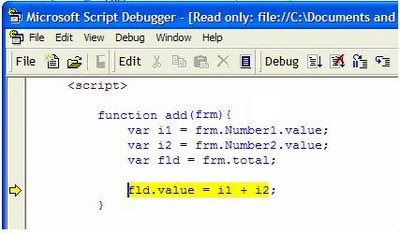 Now we see where is error, but still could not understand "why?"
 Now we are definitely close to solve the problem, we see that we did not take "number" field. Why we did not take number field? yes because of small first letter. We should wrote Number but not number.
[Java]
- Java debug console (System.out.println(“text”);
- Try / catch with NotesError and NotesException classes
- Remote java debugging with Eclipse
also I would like to recomend you external LN application openlog.nsf
[@Formula]
- @Prompt and @StatusBar – the easiest way to debug code written on @Formula
- Field Debug_Fld := value_debug
- @MailSend – for code that runs on server (sch. agents)
- notes.ini - I don't like this approach because of size of variables
Example
strA := "ABC"; strB := "DEF";
strC := strA + strB;
@Prompt([ok]; "strC";"strC = " + strC);
@StatusBar("strC = " + strC);
Field Debug_FieldName := strC;
@MailSend("username";"";""; "debug strC"; ""; "strC = " + strC);
[Lotus Script]
- Lotus Script Debugger as tool for debugging
- Print, MsgBox, NotesLog, Stop, on erorr goto errh
Example
Dim strA As String
Dim strB As String
Dim strC As String
strA = "ABC"
strB = "DEF"
strC = strA & strB
Print "strC = " & strC
Msgbox "strC = " & strC
Stop 'enable debugger require
Dim currentLog As New NotesLog( “debug log 1" )
Call currentLog.OpenFileLog( "c:\log.txt" )
Call currentLog.LogAction( "strC = " & strC)
Call currentLog.Close
[Schedule Agents]
- remote debugger (it is easy to enable it if you read help)
- send an email, msgbox (log.nsf), noteslog
[JavaScript]
- alert(value);
- try – catch();
- Microsoft script debugger \ Mozilla firebug \ Chrom debugger
Lets catch the next simple error
Example
 code on the button use call function add, the body of function below
function add(frm){
var i1 = frm.Number1.value;
var i2 = frm.Number2.value;
var fld = frm.total;
fld.value = i1 + i2;
}
when we call function we will see next error:
 what it could be? it does not provide us enough information (I think so). Now enable ie debugger
 click Yes
 Now we see where is error, but still could not understand "why?"
 Now we are definitely close to solve the problem, we see that we did not take "number" field. Why we did not take number field? yes because of small first letter. We should wrote Number but not number.
[Java]
- Java debug console (System.out.println(“text”);
- Try / catch with NotesError and NotesException classes
- Remote java debugging with Eclipse
also I would like to recomend you external LN application openlog.nsf
Thursday, December 18, 2008
How we can copy ReplicaID to clipboard
Approach #1. Just make double click on triangle of Address bar, and you will get ReplicaID of database.

Approach #2. Open properties on document and look on "Meta" tab.

Thursday, September 25, 2008
get user name from id file
Lets think, if you should receive a name from user.id. Which approach did you choose? I made it using next function. Would be great if somebody share another approach. I think it is possible to use Notes API approach...
Dim s As New NotesSession
Dim stream As NotesStream
Dim body As Variant
Dim pathname As String
Dim strBody As String
pathname = "c:\user.id"
Set stream = s.CreateStream
If Not stream.Open(pathname, "ASCII") Then
Messagebox pathname,, "Open failed"
Exit Sub
End If
If stream.Bytes = 0 Then
Messagebox pathname,, "File has no content"
Exit Sub
End If
body = stream.Read(stream.Bytes)
Call stream.Close
Forall x In body
If x <> 0 Then
strBody = strBody & Chr(x)
End If
End Forall
Msgbox Strleft(Strrightback(strBody, "CN="), "/")
Dim s As New NotesSession
Dim stream As NotesStream
Dim body As Variant
Dim pathname As String
Dim strBody As String
pathname = "c:\user.id"
Set stream = s.CreateStream
If Not stream.Open(pathname, "ASCII") Then
Messagebox pathname,, "Open failed"
Exit Sub
End If
If stream.Bytes = 0 Then
Messagebox pathname,, "File has no content"
Exit Sub
End If
body = stream.Read(stream.Bytes)
Call stream.Close
Forall x In body
If x <> 0 Then
strBody = strBody & Chr(x)
End If
End Forall
Msgbox Strleft(Strrightback(strBody, "CN="), "/")
Sunday, September 21, 2008
easy way to debug schedule agents
If you have problems with debugging formula's schedule agents (they run on server) you can send an email to yourself directly in this agent with debugging data.
Look at this simple code in schedule agent. Would you like to check which value contain strC ? no problem, send an email yourself...
strA := "ABC";
strB := "DEF";
strC := strA + strB;
@MailSend("your are";"";""; "debug strC"; ""; "strC = " + strC)
Look at this simple code in schedule agent. Would you like to check which value contain strC ? no problem, send an email yourself...
strA := "ABC";
strB := "DEF";
strC := strA + strB;
@MailSend("your are";"";""; "debug strC"; ""; "strC = " + strC)
Subscribe to:
Posts
(
Atom
)